Time tracking
Record and settle your team's working time, keep overtime under control and hand payroll clean data — no spreadsheets.
- Clock-in and digital timesheets
- Overtime and balance settlement
- Automatic reports by email
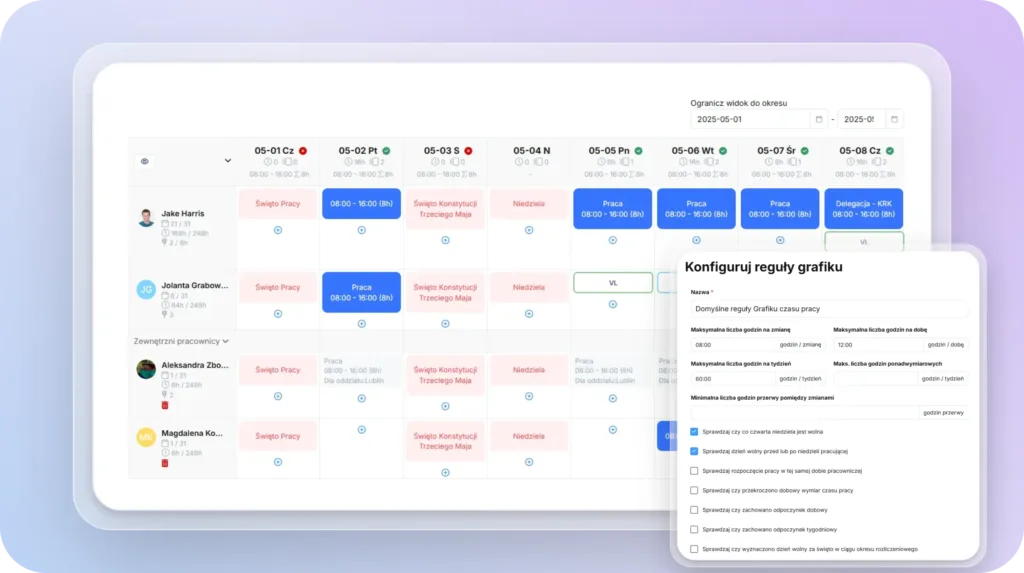
Automate shift scheduling. Build work schedules for departments and locations that comply with labour law, publish them online and keep employees informed of changes.

Schedule builder

Shift schedules

Overtime

Notifications

30 days free. Schedules that comply with labour law, generated automatically.
Module pricing
~$1.99 / 1 user
Based on a set of parameters, the system generates schedules for a selected group of employees on its own, flags any inconsistencies (e.g. exceeded working-time limits), and — once the administrator approves the schedule — publishes it automatically and notifies employees about the new plan.
The schedule is generated based on a set of parameters:
It can also use pre-built schedule templates.
Once the schedule is filled in automatically, the system:
This feature significantly speeds up scheduling, especially for recurring shift patterns.
Yes, the schedule is created automatically based on the criteria you set.
When generating schedules automatically, the system takes into account:
The system generates the schedule based on these criteria and then verifies compliance with all the limits, displaying alerts if anything is violated.
Thanks to automation, preparing schedules is quick and intuitive.
Yes, the scheduling tool is built around labour-law requirements and takes into account daily and weekly rest periods, free Sundays, the start of a new working day, the length of the settlement period and other rules required to build compliant work schedules.
The system is also kept up to date whenever the relevant regulations change.
Yes. Every employee can see the full history of their own schedules in their profile. Managers can view their team's history, and the module administrator has access to a report with the option to export data to an XLS file.
Yes. Our scheduling tool can be used by companies working with different settlement periods of different lengths, starting at different points in the year.
Yes. Existing work schedules can be copied easily, which gives you:
Combined with templates and automatic filling, the copy feature makes scheduling highly efficient and lets you focus on managing exceptions rather than routine planning.
Yes. The module lets you build schedules based on defined criteria while keeping track of the applicable working-time system and limits required by labour law, including the maximum number of hours per shift/week, overtime, breaks between shifts, and daily rest periods.
Yes, employees are notified about new schedules and any changes made to them.
Notifications when a schedule is published online:
Benefits of automatic notifications:
tomHRM works with all working-time systems, including the equivalent system and shift-based systems.
The schedule is available online once employees log into the system. Employees receive an email notification whenever a new shift plan is published. The system administrator can also export it to PDF for employees to review.
The system lets you build schedules for direct reports, departments and locations.
Yes, the system lets you create fixed working-hour patterns. These can cover single days or entire weeks. Templates significantly speed up the scheduling process.
Yes, once a schedule is filled in, the system automatically checks whether any hourly limits have been exceeded. Alerts appear if there are any issues. The system can check things such as:
Yes, when planning schedules you can set a time frame spanning several months ahead.
Didn't find your answer?
Book a meetingCombine tomHRM modules into a single HR platform and work on consistent data without re-entering information between systems.

Record and settle your team's working time, keep overtime under control and hand payroll clean data — no spreadsheets.

Manage absences across the whole company in one place — from request to approval, balances and compliant reporting.

Describe role requirements and compare them with your team's real skills to plan development and promotions with intent.